Kindergarten Technology Lessons
|
|
Kindergarten technology lessons to develop mouse and navigation skills, strong keyboarding and writing proficiency as well as artistic drawing and painting ability.
By following the Kindergarten technology lessons outlined below, children will develop the ability to navigate and use a mouse proficiently, open and close programs, type as well or better than they hand write, and write words, sentences and short paragraphs in a word processor. They will also develop a natural comfort and sense of confidence using technology.
This technology curriculum can be used effectively in a classroom or homeschool setting.
Technology Learning Programs Kindergarteners Use:
Microsoft Office Word |
|
Type to Learn Jr. |
|
| Internet Explorer - To find fun learning sites like ABCya and Starfall or to take a virtual tour of the White House. | |
Kid Pix Deluxe |
|
Jumpstart Kindergarten - Fun learning games and puzzles that teach fundamentals like rhyming, counting, ordering sequencing shapes colors and Telling time. |
|
| Jumpstart 1st Grade -Teaches: reading, math, spelling, phonics, time, grammar, money. |
Kindergarten Technology Lesson Schedule:
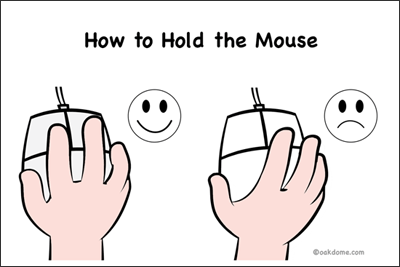
The schedule begins the school year by familiarizing the Kindergarteners first with using the mouse. Many Kindergartners will need training and practice holding the mouse properly and learning how to click with their pointer fingers. The Jumpstart Kindergarten learning game works well for this purpose. This educational game covers a full year of pre-reading, early math, language, and creative arts. Additionally, children will use the keyboard simply to type their name into the program. This is a great time to introduce the backspace button to learn to fix spelling mistakes.
Typing is gradually introduced using Type to Learn Jr, where the children will initially type a few minutes each session (~10 minutes) working towards the ability to consistently type the entire alphabet. As the year progresses, children will type a few more minutes and include the numbers along with the alphabet, later adding upper case letters, punctuation and finally complete sentences. Near the end of the year, most students can type 20 - 30 minutes and complete the entire sequence of alphabet to sentences and earn a printed Certificate of Completion in Type to Learn Jr.
Word processing using Microsoft Word is interspersed with typing throughout the year. The lessons are often timed to write simple letters to parents for holidays and vacations. Kindergartners will learn how to use shift to capitalize letters, backspace to fix mistakes, and enter to go to a new line along with some basic font formatting and printing.
Kidpix is introduced to explore and develop children's creative drawing and painting ability. Students learn to use paint, watercolor, airbrush, pencil, crayon, marker, chalk, etc. The software has special effects (animate, smudge, smear, warp twist, etc.) sounds, backgrounds, stamps and the ability to import digital photos to personalize. This program is VERY engaging and fun for students of all ages.
Late September - Early October
Introduction - Rules of the Computer Lab - Computer Parts Names (1 session)
Introduction to the computer lab teacher, discuss what we will do in the lab. Talk about rules of the computer lab, talk about how to sit in the chairs, raising hand to go to the bathroom, taking a buddy with you to the bathroom, washing hands before returning from bathroom. Discuss keeping hands to oneself, no running in the lab, keeping fingers out of mouth and nose. Following the same rules as in the regular classroom . Briefly review the names of the main computer parts such as monitor, keyboard, mouse, CPU.
October
Jumpstart Kindergarten Introduction (1-2 sessions) Use of this game is ongoing and review is given several times as needed.
Introduce Jumpstart Kindergarten. Demonstrate how to open the program, how to enter the students' name, usage of backspace to fix mistakes, and basics of game play. Also demonstrate how to exit the game.
October - November
Type to Learn Jr. Introduction (1) session. Practice (5) sessions through November.
Type to Learn Jr. - Introduce the program and characters Shelby and Max. Demonstrate how to enter the students' name, use of backspace to fix mistakes. Explain and demo how to type the alphabet using both hands, using the red keys for left hand and purple keys for the right hand. Keep typing times 10 minutes or less then allow kids to play Jumpstart Kinder for remaining time. Progress towards more time and typing uppercase letters, numbers and punctuation if possible in October and November for about 6 sessions.
December
Microsoft Word Introduction (1-2) sessions Winter Break "Happy Holiday" letter to family.
Session 1 - Introduce the program and explain it's usage for writing words and sentences in Kindergarten. Discuss how to open and close the program. Demonstrate backspace, enter, shift, undo keys. Write 1 or two short sentences and add the student's name. Print.
Session 2- Have kids follow along word by word while typing short Holiday letter for winter break in December. Add a graphic, increase font size and print with assistance.
January
Type to Learn Jr. (2-3 sessions)
Type to Learn Jr. - Review typing with two hands, walk around while kids type and use gentle reminders to use both hands, red keys are left hand, purple keys right hand. Time = about 15 minutes per session. Type the alphabet, numbers and uppercase letters. Add punctuation and sentences as proficiency improves.
Late January - Early February
Microsoft Word (2 sessions)
Session 1 - Practice writing simple sentences with classroom vocabulary / spelling words. Introduce adding graphical shapes (happy face, heart). Demonstrate font sizing, printing.
Session 2 - Happy Valentines' Day letter. Review backspace, enter, shift, undo keys, font sizing. Add heart shape(s) and print with assistance.
March
Kid Pix Introduction (2-3 sessions)
Kid Pix - Introduce "Paint a Picture" section. Session 1 - Explain pencil, paint bucket, eraser tools. Draw a house, sun, sky scene. Session 2 - Review previous tools and add paint brush. Draw a picnic scene with trees, rainbow, sun , etc. Have fun with silly paint tools. Session 3 - Review previous tools and add stamps. Draw beach scene with waves and add boats, planes etc.
Late March - Early April
Type to Learn Jr.
Type to Learn Jr. - Practice typing. Extend time and work towards earning typing certificates. Walk around the class and continue gentle reminders to use both hands during sessions.
Microsoft Word
Happy Spring Break letters. Demonstrate how to add, size, delete, undo shapes. Kids can print by themselves or with assistance.
May
Microsoft Word
Happy Mother's Day Letters. Students will write Happy Mothers' Day letters and use graphic shapes to decorate their letter. Students will print their work.
Internet Explorer
Introduce Internet Explorer, usage of back and forward buttons, clicking of links. Go to Starfall telling time, ABCya and others.
June
Type to Learn Jr.
Type to Learn Jr. - Working towards earning typing completion certificates. By this time most of the children will be able to complete all the requirements - lower case alphabet, numbers, uppercase, punctuation and sentences.
Microsoft Word
Happy Father's Day Letters. Students will write Happy Father's Day letters and use graphic shapes to decorate their letter. Students will print their work.
Jumpstart 1st Grade
Jumpstart First Grade - Introduction of interface and activities.
Free Time - Play